

TCP redirecting
Latest version: 5.0.1 build 909. September 11, 2026.
The TCP Redirect plugin lets you send parser variable values from all our data loggers to any TCP server. It provides a simple way to push real-time notifications and complete data packets to remote systems, dashboards, web servers, or custom applications. The plugin works as a side channel and does not interrupt or change data processing by other modules.
You configure the plugin by selecting a parser variable that already exists in your ASCII Data Parser or other parser module. Typical use cases include sending the FULL_DATA_PACKET variable, which contains the complete processed data packet, or sending individual variables such as device status, error code, or measurement value. For example, you can forward the latest temperature measurement from a COM port device to a TCP listener service that stores the data in a database or triggers an alarm.
The module requires the target IP address and TCP port of the destination server. When the logger receives data, the parser extracts values into variables. As soon as the TCP Redirect plugin reads a new value for the selected variable, it establishes a TCP connection (or reuses an existing one), sends a data packet with the variable value, and keeps the session open based on the configured timeout. The target system can be on the same computer, on a local network, or in a remote data center.
Although this plugin is in the Filters group, it does not modify or block parsed data for other plugins. All standard workflows, such as writing to a CSV file, database insertion, or publishing via OPC, continue to work as before. The TCP Redirect plugin simply mirrors selected parser variable values to a TCP server.
Example: Integration with Advanced Serial Data Logger
In this example, Advanced Serial Data Logger receives data from a COM port connected to a temperature controller. The ASCII Data Parser extracts values into parser variables, including FULL_DATA_PACKET and a separate temperature variable. The TCP Redirect plugin sends the FULL_DATA_PACKET variable to a remote monitoring service running on IP address 192.168.10.50 and port 5000.
Sample incoming serial data:
<2026-01-02 08:00:00 RX COM1>
#T;25.7;OK<CR>
Parser output variables:
DATE_TIME_STAMP = 2026-01-02 08:00:00
FULL_DATA_PACKET = #T;25.7;OK
DEVICE_ID = TCTRL01
TEMPERATURE_C = 25.7
STATUS = OK
TCP Redirect plugin configuration:
- Parser item name: FULL_DATA_PACKET
- Target IP address and port: 192.168.10.50:5000
- TCP session life time: 5 seconds
- Send responses from the target server to the data capture interface: Enabled
Data sent by the plugin to the remote TCP server:
Payload:
#T;25.7;OK
If the remote TCP server replies with an acknowledgment string such as ACK;25.7, and if the response forwarding option is enabled, the plugin sends that reply back to the COM1 port. The device then receives the response as if it came directly from the monitoring service. This option allows you to build request-response data processing streams where the logger sits in the middle and passes messages between the device and the external TCP service.
Example: Integration with Advanced TCP/IP Data Logger
In a usage scenario with a network, Advanced TCP/IP Data Logger listens on a TCP port and receives messages from multiple devices. The ASCII Data Parser processes each message and populates variables such as FULL_DATA_PACKET, DEVICE_ID, and MEASURED_VALUE. The TCP Redirect plugin then forwards only the critical values to a central analytics engine running on a different server.
Sample incoming TCP message to the logger:
2026-01-02 08:00:00 RX TCP: DEV=FLOW01;VAL=123.45;UNIT=LPM
Sample parser output variables:
DATE_TIME_STAMP = 2026-01-02 08:00:00
FULL_DATA_PACKET = DEV=FLOW01;VAL=123.45;UNIT=LPM
DEVICE_ID = FLOW01
MEASURED_VALUE = 123.45
UNIT = LPM
TCP Redirect plugin configuration:
- Parser item name: MEASURED_VALUE
- Target IP address and port: 10.0.0.20:6001
- TCP session life time: 3 seconds
- Send responses from the target server to the data capture interface: Disabled
Data sent by the plugin to a server:
123.45
Example: Using TCP Redirect with Data Encode Plugin and JSON
A common usage case is to combine the TCP Redirect plugin with the Data Encode plugin to build structured JSON messages before they are sent to a remote TCP server. In this setup, the ASCII Data Parser first extracts values from the raw protocol, the Data Encode plugin assembles those values into a JSON string, and the TCP Redirect plugin forwards that JSON string to an HTTP gateway, message broker, or custom microservice that expects JSON.
Sample incoming serial data:
<2026-01-02 08:00:00 RX COM3>
ID=INV01;PWR=1500.2;STAT=RUN
Sample parser output variables:
DATE_TIME_STAMP = 2026-01-02 08:00:00
DEVICE_ID = INV01
POWER_KW = 1500.2
STATUS = RUN
Data Encode plugin configuration to create a JSON in the necessary format:
Assign result to parser item: JSON_PAYLOAD
Compact: False (for better readability in this example)
All trailing newline characters: True
Encode variables:
  DATE_TIME_STAMP->timestamp
  DEVICE_ID->device
  POWER_KW->power_kw
  STATUS->status
Resulting encoded variable:
JSON_PAYLOAD =
{
  "timestamp": "2026-01-02 08:00:00",
  "device": "INV01",
  "power_kw": 1500.2,
  "status": "RUN"
}
TCP Redirect plugin configuration for JSON:
- Parser variable name: JSON_PAYLOAD
- Target IP address and port: 172.16.1.200:7000
- TCP session timeout: 4 seconds
- Send responses from the target server to the data capture interface: Disabled
Key Features
- Forwards selected parser variable values, including FULL_DATA_PACKET, to any local or remote TCP server.
- Works with all our data loggers without changing existing processing chains.
- Combines with the Data Encode plugin to send JSON or other encoded formats to target services.
- Supports configurable TCP session timeout (life time.
- Optional forwarding of server replies back to the original data source interface for bidirectional communications.
- Simple configuration includes the parser variable name, target IP address, and TCP port.
Summary
The TCP Redirect plugin offers a straightforward way to mirror parsed data, JSON payloads, or full packets to any TCP endpoint while keeping your current data logging and processing chain.
How to enable this plugin
The figure below shows how to select the plugin on the "Modules" page.
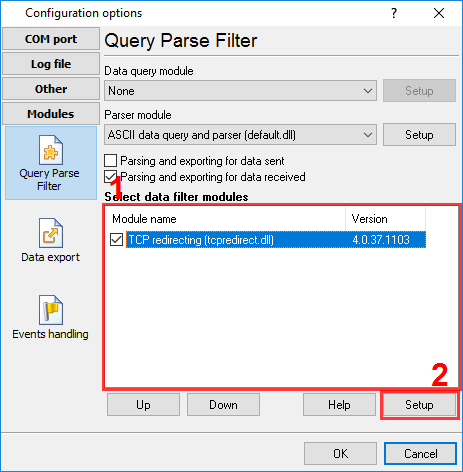
Fig.1. Selecting the plugin.
How to configure the plugin
The figure below shows how to configure the plugin to poll the device every 15 seconds. Of course, you may change the poll interval as you want.
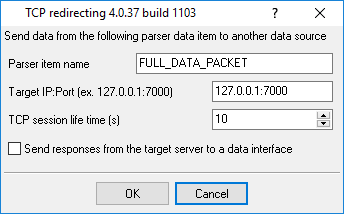
Fig.2. Configuring the plugin.
Read more about other plugins:
All plugins | Deadband | Expressions | Aggregator | Digital inputs filter | Script execute | Events generator | Redirect data | Redirecting data to a TCP server | Data timeout | Alarms Professional | Data Encode | Data From List | Failover | Summary statistics