

Failover - distributed backup for data interfaces
Latest version: 5.0.1 build 909. September 11, 2026.
The Failover module provides a distributed backup system that switches receive and handling functions between program instances when data reception problems occur. It reduces downtime and data loss by allowing a secondary instance to take over automatically and return control when the primary recovers. The module supports multiple monitored conditions: parser variables (watchdog items), log messages, SQL errors, and connection loss. Administrators can receive notifications for each unusual event.
Installation and configuration require two program instances (primary and secondary) deployed on one or several computers. You can export settings from one instance and import them into another. The module only operates in configurations where it is explicitly enabled. The primary instance manages one or more secondaries and issues on/off commands. The secondary starts in standby, connects to the primary, and awaits activation. Priority values determine which secondary will be selected when multiple secondaries are available (lower numeric value = higher priority).
There are two run modes: cold and hot. In cold mode the instance does not connect to data sources and does not receive data. Use cold mode for a passive standby where no data connections should be active. In hot mode, the instance connects to sources and processes incoming data. When the secondary is inactive, the Failover module filters all data so that lower-level filters and export modules do not receive it; when active, data flow passes the Failover module normally. Logging timing (before or after filtering) is configured in the log file settings.
Practical example: a primary service processes sensor streams and exports to SQL. You configure the secondary on a separate host with "Mode=hot" and "Priority=10". If the primary reports no data for 30 seconds via the watchdog, the secondary will engage and begin parsing and writing to the same SQL export. When primary data resumes, the primary suspends the secondary and reclaims the active role automatically.
Watchdog Items
The watchdog monitors parser variables for timely and valid updates. Supported checks include no data timeout, constant data timeout, and bad data (NULL) timeout. Specify a list of variables to monitor. The module can optionally remove watchdog items from exported data streams so they are not written by export modules.
Example watchdog configuration:
- ITEM: Temperature
- Timeout of no data: 30 (seconds)
- Timeout of constant data: 300 (seconds)
- Timeout of bad data: 60 (seconds)
If "Temperature" does not update within 30 seconds, the module flags an error and triggers failover.
Key Features
- Automatic failover between primary and secondary interfaces.
- Watchdog monitoring for parser variables with configurable timeouts.
- Analyze program log messages using regular expression to detect alarms and trigger failover.
- SQL event generation for monitored data and error conditions in your database.
- Cold and hot run modes to control standby behavior.
- Priority-based selection among multiple secondary interfaces.
Summary
The Failover module delivers reliable, configurable automatic switching between data interface instances to reduce downtime and data loss. It integrates with most of our data logger software.
How to enable this plugin
The figure below shows how to select the plugin on the "Modules" page.
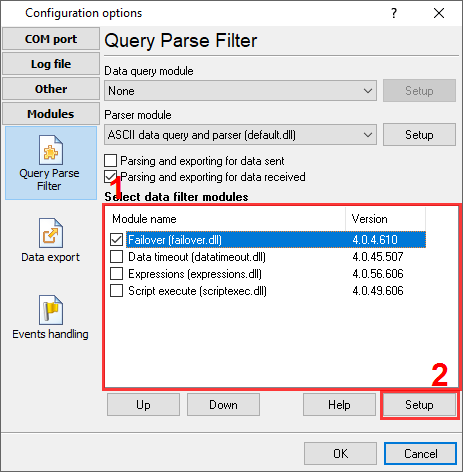
Fig.1. Selecting the plugin.
How to configure the plugin
The figure below shows how to configure the plugin. Please, look at the documentation for the full description of all settings.
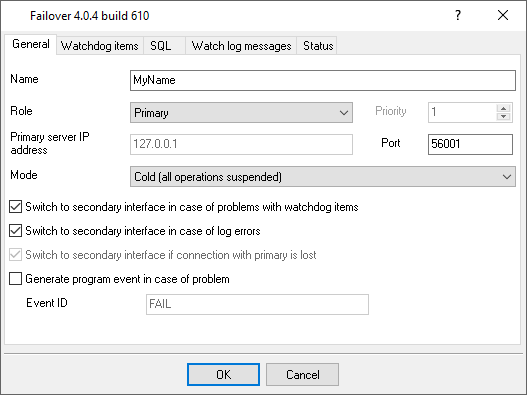
Fig.2. Configuring the plugin.
Read more about other plugins:
All plugins | Deadband | Expressions | Aggregator | Digital inputs filter | Script execute | Events generator | Redirect data | Redirecting data to a TCP server | Data timeout | Alarms Professional | Data Encode | Data From List | Failover | Summary statistics