

IEC 62056-21
Latest version: 5.0.1 build 909. September 11, 2026.
The IEC 62056-21 module reads meter data from devices that implement the IEC 62056-21 protocol over RS232 or RS485. This module works only with Advanced Serial Data Logger or Data Logger Suite. Create a new configuration and select the COM port used by the RS232 or RS485 interface. It supports modes A, B, C and D and uses the "Readout" command to request a full dataset in a single exchange. Optical probes require an Opto-to-RS232 converter. Typical compatible devices include Satec EM720, Iskra Emeco MT series, Elgama-Elektronika GAMA 300, DSS1088 and Landis+Gyr models.
Typical use cases
Use the module to poll multiple meters on an RS485 network and forward measurements to a database, Excel, CSV or other destinations. The module supports scheduled polling and a request queue. It extracts values and passes them to the main program for logging, export or real-time processing. If no response item list is defined, the parser exports all available OBIS-coded values by default.
Request queue and how it works
A request queue defines polling actions and target devices. Each request runs in sequence from top to bottom. A request item can target a single device or multiple addresses separated by semicolons, for example "1;2;3". Configure a request by adding a description and enabling the "Send requests, otherwise only process responses" option to actively poll devices. Typical parameters you must set are device address, request timeout in milliseconds and optional baud rate switching.
The request timeout determines how long the module waits for a response after sending a request. If the timeout expires, the module cancels the request and moves to the next one. Any subsequent data from the timed-out device will be ignored. Choose a timeout that suits your network and device performance.
Response items and variable mapping
Response items define which values the module extracts and how they are named. If the response items list is empty, the parser exports all supported OBIS codes that the device returns. To limit exported fields, add response items and assign each a unique Name and the corresponding OBIS code. The Name becomes the exported variable name in the main program. Variable names must be unique inside a request but can repeat across different requests.
Practical example: single meter readout
Example scenario: a single meter at address 1 on RS485 responds to a Readout. Request configuration:
- Device: 1
- Send requests: enabled
- Request timeout (ms): 2000
- Response items: empty (export all OBIS values)
Sample incoming data packet block (simplified):
/SAT6EM72000656621
0.0.0(EM72000656621)
1.8.0(343642.9*kWh)
2.8.0(1958.9*kWh)
3.8.0(120.7*kvarh)
Exported variables (after parsing):
DATE_TIME_STAMP = 2026-01-02 08:00:00
ENERGY_TOTAL = 343642.9
ENERGY = 1958.9
REACTIVE_ENERGY = 120.7
Key features
- Full support for IEC 62056-21 modes A, B, C and D.
- Request queue with per-request timeout and multiaddress support.
- Automatic export of all OBIS values when no specific response list is defined.
- Per-request baud rate change handling for standards-compliant devices.
- Direct integration with Advanced Serial Data Logger and Data Logger Suite.
- Configurable response item mapping to custom variable names.
Summary
The IEC 62056-21 module provides a robust way to poll meters over RS232/RS485 and export parsed OBIS values to logging and export modules. Set up request queues, link response items to variable names, and set up automated data collection to go to the right place (like an Excel or database).
How to enable this plugin
The figure below shows how to select the plugin on the "Modules" page.
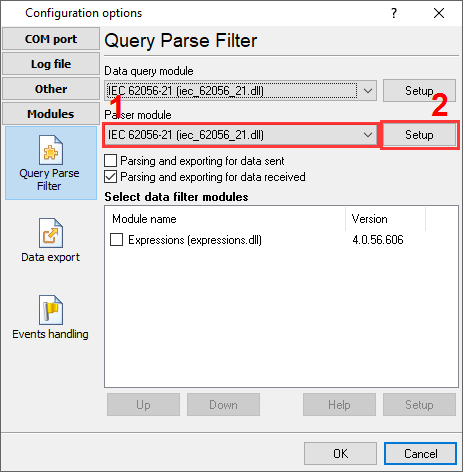
Fig.1. Selecting the plugin.
How to configure the plugin
The figure below shows how to configure the plugin. Please, look at the documentation for the full description of all settings.
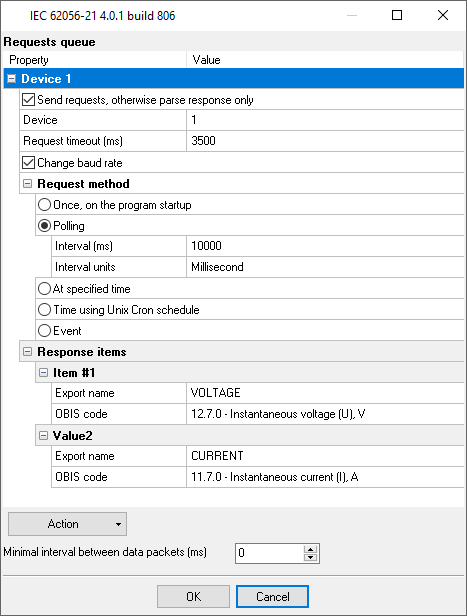
Fig.2. Configuring the plugin.
Read more about other plugins:
All plugins | MODBUS RTU, MODBUS TCP, MODBUS ASCII | M-Bus | Bacnet/IP | IEC 62056-21 | DLMS/COSEM | DL-T645-2007 | CJ/T 188-2004 | Kamstrup [KMP protocol]