

MODBUS RTU, TCP, ASCII data parser
Latest version: 5.0.1 build 909. September 11, 2026.
The MODBUS RTU/ASCII and MODBUS TCP plugins provide a complete set of functions for industrial data acquisition and protocol emulation. It supports master mode for active polling, slave mode for device emulation, and passive mode for bus monitoring. The plugin decodes requests and responses, verifies checksums, parses registers and bits, and prepares data for exporting to files, Excel, or databases. It also supports custom formulas for response items and flexible grouping of exported rows.
Core capabilities and practical examples
As a MODBUS master, the plugin sends requests such as function 3 (read holding registers) or function 4 (read input registers). For example, request a sequence of five registers from device 10 with first register offset 99 and registers to read 5. The plugin calculates the checksum, sends the packet, waits up to the configured request timeout, parses the response and extracts each register as configured types. Example request parameters: Device address = 10, Function = 3, First register = 99, Registers to read = 5, Request timeout = 2000 ms.
In slave mode, the plugin emulates one or multiple MODBUS devices and responds only to valid requests from a master. For example, emulate device address 20 with holding registers (function 3) mapped from offset 0 to 99. If a PLC writes single register 40100 (offset 99) the plugin stores that value and can export it immediately. Slave mode supports function codes 1, 2, 3, 4, 5, 6, 15, and 16 and returns appropriate exception codes for out of range accesses.
In passive mode, the plugin acts as a bus monitor. When used with a serial RS485 spy port, it parses both requests and responses but never transmits. For example, when a master requests device 5, function 3, address 40010 for two registers and the slave replies, the plugin verifies the checksum, decodes the two registers, applies any custom formula and exports the data. Enable "Export changed values only" to reduce output noise when polling is frequent but values change rarely.
Configuration guidance
Key request fields: Device address (0-255, can be comma separated like 1,2,3,4), Function (for example 3 or 4), Data address using full notation (for example 40001) or First register offset (zero based), "Registers to read" and "Request timeout". Use "Export data for all requests at once" to group multiple request results into one exported row when you poll the same device in several requests.
When emulating a slave device, set Active, assign Device address or addresses, select supported Function (0 for all or a combination such as 1,3), choose Data address and Registers to read to define the memory range and optionally add named Response items with data types and offsets. If you leave Response items empty, values export as unsigned 16-bit decimals with autogenerated names like VNNNNN or BNNNNN.
Integration examples with Advanced Serial Data Logger
Example 1: Master polling RS485 device
- Configuration: COM3 19200,N,8,1; Device address = 10; Function = 3; First register = 99; Registers to read = 5; Request timeout = 2000
- Sample incoming request (hex frame example): 0A 03 00 63 00 05 CRC
- Sample incoming response (decoded): DATE_TIME_STAMP = "2026-01-02 08:00:00", Device=10, Reg99=1234, Reg100=5678, Reg101=0, Reg102=1023, Reg103=250
- Exported CSV row: "2026-01-02 08:00:00",10,1234,5678,0,1023,250
Example 2: Passive bus monitoring using the same logger
- Configuration: COM3 spy mode enabled; Plugin mode = Passive; parse sent and received enabled; Export changed values only = true
- Observed frames: master → slave request for registers, then slave → master response
- Sample exported record: DATE_TIME_STAMP = "2026-01-02 08:05:00", Device=10, Function=3, Reg99=1300
Key features
- Master, slave, and passive modes for MODBUS RTU/ASCII and MODBUS TCP.
- Support for major MODBUS functions: 1,2,3,4,5,6,15,16.
- Checksum calculation and verification for serial frames.
- Byte level parsing and custom formulas for complex data types stored in MODBUS registers.
- Polling scheduler with grouped export and export changed only option.
- Emulation of multiple devices with configurable memory ranges.
Summary
The MODBUS RTU and TCP module allows reading and logging data from devices that use the MODBUS protocol. It can operate in master and slave modes with configurable data parsing, checksum handling, and custom formulas.
How to enable this plugin
The figure below shows how to select the plugin on the "Modules" page.
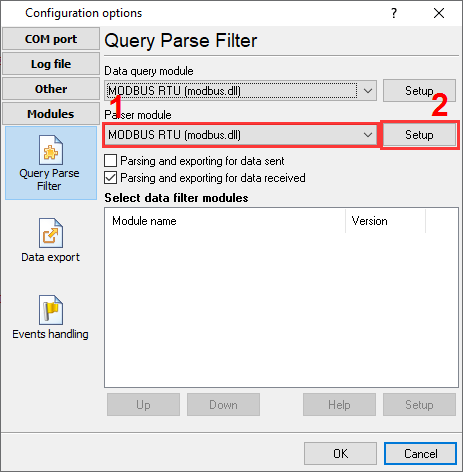
Fig.1. Selecting the plugin.
How to configure the plugin
The figure below shows how to configure the plugin. Please, look at the documentation for the full description of all settings.
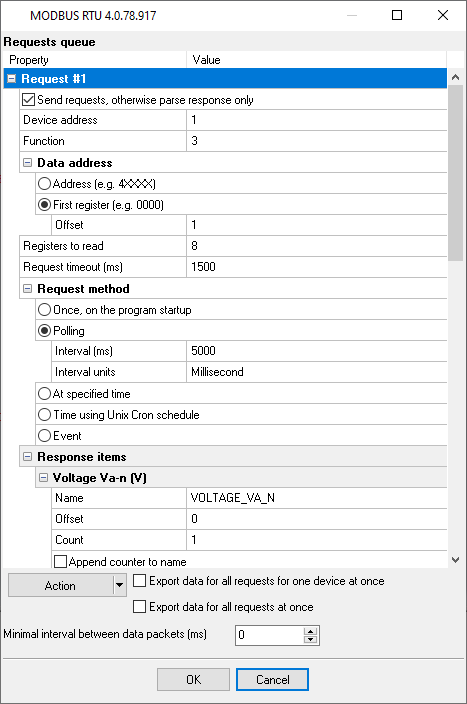
Fig.2. Configuring the plugin.
Read more about other plugins:
All plugins | MODBUS RTU, MODBUS TCP, MODBUS ASCII | M-Bus | Bacnet/IP | IEC 62056-21 | DLMS/COSEM | DL-T645-2007 | CJ/T 188-2004 | Kamstrup [KMP protocol]