

Log packing
Latest version: 5.0.1 build 909. September 11, 2026.
The Log packing events handling module is an add-on for all our data loggers. It automates compression of completed log files and helps you keep disk usage under control without manual maintenance. When the data logger switches to a new log file, this module can immediately compress the previous file using a built-in ZIP archiver or any external command-line archiver. With correct log rotation settings, you can run logging for months or years while controlling the growth of your log folder.
This plugin is useful in many scenarios. For example, you may receive continuous Modbus RTU data through Advanced Serial Data Logger or collect TCP data from multiple industrial controllers through Advanced TCP/IP Data Logger. Both cases generate large daily log files. The Log packing module automatically compresses each old log file when a new file starts, optionally moves it to a dedicated archive folder, and removes the original file after a successful check. This workflow reduces disk space usage several times over use and keeps log folders tidy while still allowing you to access archived data for later analysis or audits.
Main configuration options
The module configuration is compact and easy to understand. You first select whether to use the internal ZIP archiver or an external command-line packing tool. Next, you set compression parameters, destination directory, and behavior for deletion and output processing.
Practical usage with Advanced Serial Data Logger
Consider a typical serial logging installation. Advanced Serial Data Logger collects data from several devices over RS232 ports. You enable daily log rotation so each day the logger writes to a new file, for example:
C:\Logs\COM1_2026-01-02.log
C:\Logs\COM2_2025-11-22.log
At midnight the logger closes the file COM1_2026-01-02.log and opens COM1_2025-11-22.log. The Log packing module detects this event and runs according to your settings. Using the internal archiver, it can create a file:
C:\Logs\Archive\COM1_2026-01-02.zip
If you have the delete option enabled, the module checks the new ZIP file. If everything is correct, it deletes COM1_2026-01-02.log, which frees space while keeping your serialized data secure inside the compressed archive. If something goes wrong, the original log remains in place, and you will see an error in the logger log for further diagnosis.
If you choose an external archiver, your command line could be:
"C:\Program Files\7-Zip\7z.exe" a -tzip "%FILEPATH%Archive\%FILENAME%.zip" "%FILE%"
When the module runs this command, it replaces the macros with real values, so for a log file:
C:\Logs\COM1_2026-01-02.log
It executes:
"C:\Program Files\7-Zip\7z.exe" a -tzip "C:\Logs\Archive\COM1_2026-01-02.log.zip" "C:\Logs\COM1_2026-01-02.log"
Key features
- Automatic compression of completed log files when rotation switches to a new file.
- Choice between internal ZIP archiver and any external command-line archiver.
- Macro support (%FILE%, %FILENAME%, %FILEPATH%) in the external archiver command.
- Optional password protection and destination folder control for the internal archiver.
- Safe deletion of source logs with archive size verification and completion checks.
- Redirected archiver output to a program protocol file for easier diagnostics.
Summary
The Log packing events handling module gives you automated control over log file growth with minimal configuration effort. It integrates tightly with Advanced Serial Data Logger and Advanced TCP/IP Data Logger, supports both built-in and external archivers, and enforces safe deletion rules. By compressing completed logs and optionally moving them to archive storage, you can keep your disk size low while still retaining full historical data for analysis.
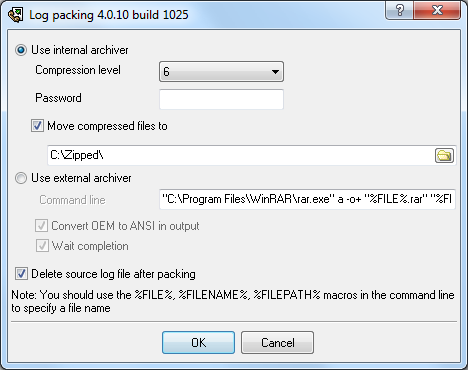
Fig.1. The plugin window.
Read more about other plugins:
All plugins | Events notification | Internet sharing | Scheduler & Hotkeys | Logs packing and compression | Import logs with data